Framework Keyboard Beats Logitech for Couch Surfing
Framework's new wireless keyboard with touchpad offers a superior alternative to Logitech's popular K400 for couch computing. With flexible connectivity and a refined design, it aims to make living room PC use more enjoyable.

Framework’s New Keyboard Aims to Conquer Couch Computing
Tired of juggling clunky keyboards on your couch? Framework, known for its highly customizable laptops, has just released a wireless keyboard designed specifically to solve this problem. This new keyboard aims to replace the often-disappointing options currently available, like Logitech’s popular but flawed K400.
The Framework Wireless Keyboard with Touchpad offers multiple ways to connect, making it super flexible. It comes with a small USB-A dongle that you can plug right into the back of your device. If you want a cleaner look, you can use a special adapter to slot the dongle into one of Framework’s expansion card slots, making it sit flush with the front of your laptop or PC.
For even more convenience, the keyboard also supports Bluetooth. You can easily switch between up to four different Bluetooth devices with buttons conveniently located above the touchpad. This means you can control your PC, your smart TV, or even your tablet without needing to re-pair anything.
Typing Experience and Design
When it comes to typing, the Framework keyboard feels surprisingly good. I managed to type around 93 words per minute on Monkeytype during my first try. The keys have a satisfying feel, and the overall typing experience is smooth and comfortable for extended use.
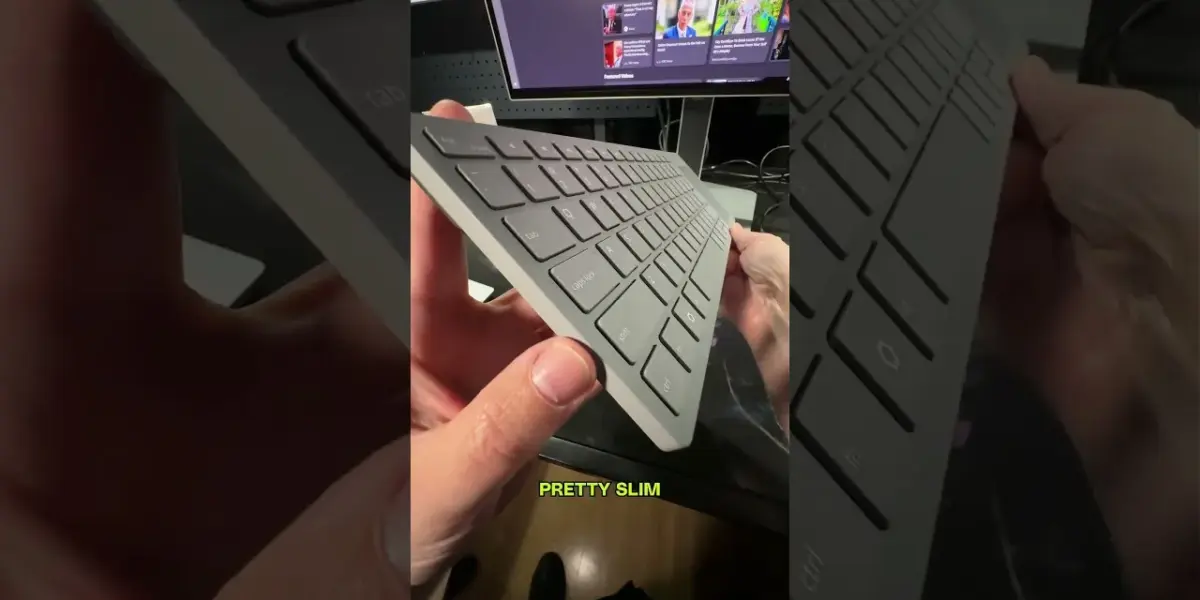
Compared to the aging Logitech K400, the Framework keyboard is noticeably slimmer and smaller. This makes it much easier to handle and store when not in use. The design prioritizes a compact and portable form factor, which is perfect for living room setups.
Why Framework is Better Than Logitech
Nura Patel from Framework shared an amusing observation: the Logitech K400 is the keyboard everyone uses, but it’s the keyboard nobody actually likes. Having spent considerable time with the K400 myself, I completely agree with this sentiment. Its keys can feel mushy, and the touchpad often lacks precision, leading to frustration.
The Framework keyboard directly addresses these shortcomings. Its responsive keys and accurate touchpad offer a much more pleasant user experience. The flexibility in connection options, combined with a sleeker design, makes it a clear upgrade for anyone who frequently uses a computer from their couch.
Who Should Buy This Keyboard?
This keyboard is perfect for anyone who enjoys using their computer from the comfort of their couch or living room. If you often stream content, browse the web, or even do light work from a sofa, this keyboard will significantly improve your experience. It’s also a great option for users with home theater PCs or anyone looking for a clean, wireless setup.
Even if you don’t currently own a Framework laptop, this keyboard is a compelling purchase. Its universal connectivity options mean it will work seamlessly with almost any Windows, macOS, or Linux computer. The focus on user experience and thoughtful design makes it stand out.
Specs & Key Features
- Wireless connectivity: USB-A dongle and Bluetooth
- Bluetooth pairing: Up to 4 devices
- Integrated touchpad
- Slim and compact design
- USB-A dongle storage in expansion card slot
- Targeted for couch and living room use
Availability and Pricing
The Framework Wireless Keyboard with Touchpad is available now directly from the Framework website. It is priced at $109. This puts it at a higher price point than many basic wireless keyboards, but its specialized features and superior design justify the cost for its intended audience.
The Logitech K400 Plus, for comparison, typically sells for around $40. While significantly cheaper, it lacks the advanced connectivity, refined typing feel, and premium build quality of the Framework offering. The decision comes down to whether the extra cost is worth the vastly improved experience.
Given the clear advantages in design, functionality, and user satisfaction, I’m confident that many users will be making the switch. I myself am already planning to purchase one, even without a Framework laptop. It’s that good.
Source: Have you seen this Logitech couch keyboard? (YouTube)

Related Articles


Apple, Bring Back the Mini iPhone Now!
The iPhone Mini, a beloved compact smartphone, is sorely missed by its dedicated fanbase. Users are calling for Apple to bring back the smaller form factor, citing its convenience and less intrusive nature. Despite strong user desire, sales figures led to its discontinuation.


Gaming Handhelds: Legion Go vs. Xbox Ally Show Value Gap
The gaming handheld market presents a stark contrast in price and performance between the Lenovo Legion Go and the Xbox Ally. While the Legion Go boasts premium features, its cost can soar to $3,000, making the $500 Xbox Ally a far more sensible choice for most gamers seeking portable PC gaming.


Gaming Handheld Cameras: From Game Boy to Switch
From the grainy shots of the Game Boy Camera to the 3D capabilities of the 3DS and the external webcam for the Switch, this is how cameras on gaming handhelds have evolved. We explore the unique features and target audiences for each device's imaging technology.