Apple’s iOS Update: Easier Android Switch? Not So Fast
Apple's iOS 17.3 update includes a 'Transfer to Android' option, but our testing reveals it doesn't offer a significantly simpler or new method for switching platforms, often relying on existing manufacturer apps or cables.

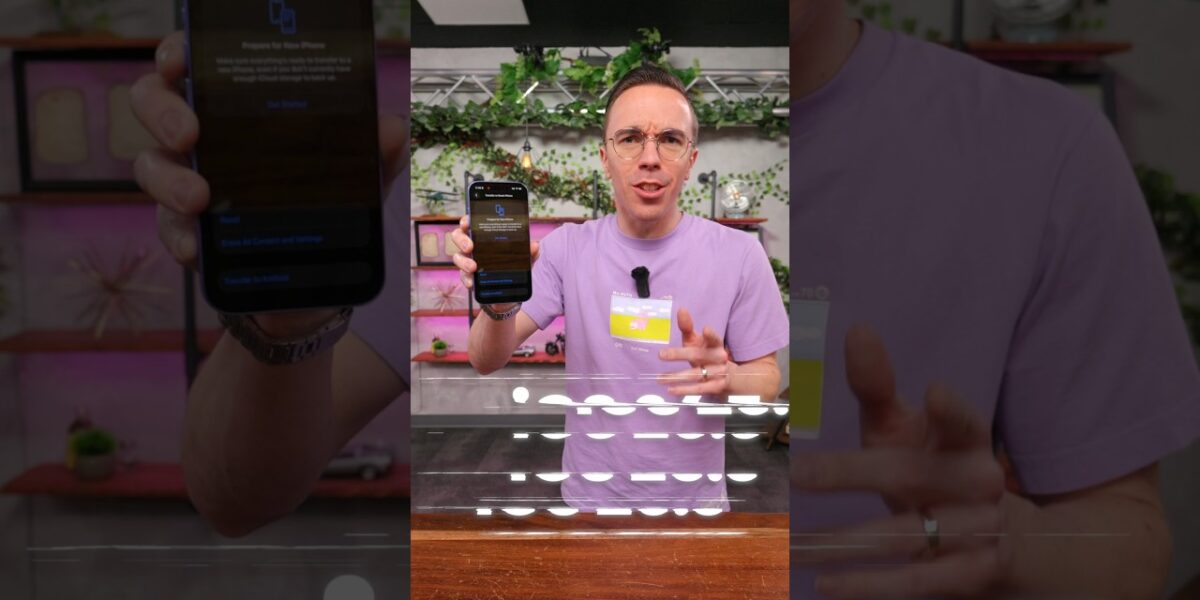
Apple’s iOS 17.3 Update: A Smoother Path to Android?
In a move that has piqued the interest of many a smartphone user contemplating a switch, Apple’s latest iOS update, specifically version 17.3, introduced a feature that seemingly aims to simplify the transition from iPhone to Android. The promise? A more streamlined process for transferring your precious data, including photos, contacts, and even eSIM profiles, directly to an Android device.
Previously, this often involved a dedicated app or a more convoluted manual process. This new option, appearing during the phone reset or transfer process, boldly states ‘Transfer to Android.’ But does it live up to the hype? We put it to the test.
The Promise vs. The Reality: A Mixed Bag
The idea is simple: when you’re ready to move on from your iPhone, the new iOS option should theoretically guide you through a seamless data migration to your new Android handset. The initial setup involves placing your Android device next to your iPhone and scanning a QR code on the Android phone to initiate the connection.
Sounds straightforward, right? Unfortunately, our testing revealed a more complex and, at times, confusing reality.
Samsung’s Smart Switch Hurdle
Our first attempt involved a Samsung Galaxy Z Flip. Upon selecting ‘Transfer to Android’ on the iPhone and being prompted to scan a QR code on the Android device, we encountered an immediate roadblock. The Samsung phone directed us to download its own ‘Smart Switch’ app.
While Smart Switch is a robust data transfer tool for Samsung devices, the very act of needing to download a specific app on the destination Android phone seems to undermine the supposed directness of Apple’s new iOS feature. The intention, it appears, was for iOS to facilitate the transfer, not to simply point users back to the existing manufacturer-specific tools.
Google Pixel’s Cable Conundrum
Undeterred, we moved on to a Google Pixel, a device running a ‘stock’ Android experience. Here, the situation became even more perplexing. Instead of offering a wireless QR code-based connection, the Pixel prompted us to use a physical cable for data transfer.
This was particularly surprising, as the primary appeal of such a built-in feature would be its wireless convenience. The expectation was a simple, wireless handshake between the two devices, facilitated by iOS. The need for a cable on a stock Android device, which theoretically should be more open to direct integration, felt like a step backward and a departure from the promised ease of use.
What Exactly is New? The Mystery Deepens
The core of our confusion lies in discerning what, if anything, is truly *new* about this ‘Transfer to Android’ option within iOS 17.3. In both our Samsung and Pixel tests, the process we encountered bore a striking resemblance to the existing methods of transferring data from an iPhone to Android.
The prompts to use manufacturer apps like Smart Switch or to connect via cable are functionalities that have been available for some time. The much-anticipated, seamless, wireless transfer directly initiated and managed by iOS itself seemed to be absent.
It’s possible that the underlying technology has been refined, or perhaps the feature is intended to work under specific, yet unstated, conditions. However, from a user’s perspective, the experience did not immediately present a significant improvement or simplification over what was already possible. The ‘Transfer to Android’ button might be present, but the execution appears to rely heavily on existing, and sometimes cumbersome, third-party or wired solutions.
Who Should Care?
This development is primarily of interest to two groups:
- iPhone users considering a switch to Android: The allure of an easier data transfer process is a significant factor for many contemplating a platform change. If this feature were fully realized, it would be a major win for Android manufacturers and a potential pain point removed for consumers.
- Tech enthusiasts and early adopters: For those who closely follow mobile OS developments, any new feature, especially one related to interoperability, is worth noting. The unexpected outcome of our testing also highlights the ongoing challenges in cross-platform compatibility.
The Verdict (So Far)
While Apple’s iOS 17.3 update includes a ‘Transfer to Android’ option, our initial testing suggests that it does not yet deliver a revolutionary, simplified, or distinctly new method for migrating data. Instead, it appears to guide users towards existing tools, whether that’s manufacturer-specific apps like Samsung’s Smart Switch or traditional wired connections, particularly on stock Android devices like the Pixel. The promise of a seamless, wireless, iOS-initiated transfer seems to be either not fully implemented, not universally applicable, or simply not as straightforward as the button’s label implies.
Until Apple clarifies the exact functionality or a more intuitive process emerges, the leap from iPhone to Android might still require a bit more effort than this latest iOS update initially suggests. We remain hopeful that future iterations will refine this feature to truly live up to its ‘easier switch’ potential.
Specs & Key Features
- Operating System: iOS 17.3 (Introduced ‘Transfer to Android’ option)
- Feature: ‘Transfer to Android’ option during phone reset/transfer
- Intended Data Transfer: Photos, contacts, eSIM profiles
- Observed Methods: Reliance on manufacturer apps (e.g., Samsung Smart Switch), wired connections (e.g., with Google Pixel)
- Not Observed: Seamless, direct, wireless transfer initiated solely by iOS
Availability and Pricing
The ‘Transfer to Android’ feature is part of the iOS 17.3 update, which is available for all compatible iPhone models. No additional cost is associated with this software feature.
Source: Apple Made it EASIER to Switch to Android? (YouTube)

Related Articles

DualSense Dominates: PS5 Controller Crowned King
Sony's PlayStation 5 DualSense controller has been crowned the best of all time, surpassing even iconic predecessors. Its innovative haptic feedback and adaptive triggers offer unparalleled immersion, setting a new standard for gaming interaction. This advanced controller is a must-have for PS5 owners seeking a deeper connection to their games.

Lenovo’s Yoga 9i: The Future of Laptops is Here
Lenovo's Yoga 9i 2-in-1 Aura Edition arrives with Intel's Core Ultra Series 3 chips, boasting a 120Hz OLED display and zero pen latency. This versatile laptop seamlessly blends power and portability for students and creatives alike.

Stop Buying the Wrong SSDs: The DRAM Cache Secret
Many SSDs hide whether they contain a crucial DRAM cache, impacting performance and reliability. This guide explains why this chip matters, how to identify it, and which brands are transparent.