Desk Tour 2026: KHC’s Long-Term Tech Favorites
KHC reveals the long-term tech staples that power his workflow, from his decade-old sit-stand desk to his current Mac Pro. Discover the highs and lows of his essential gear, rated for durability and performance.

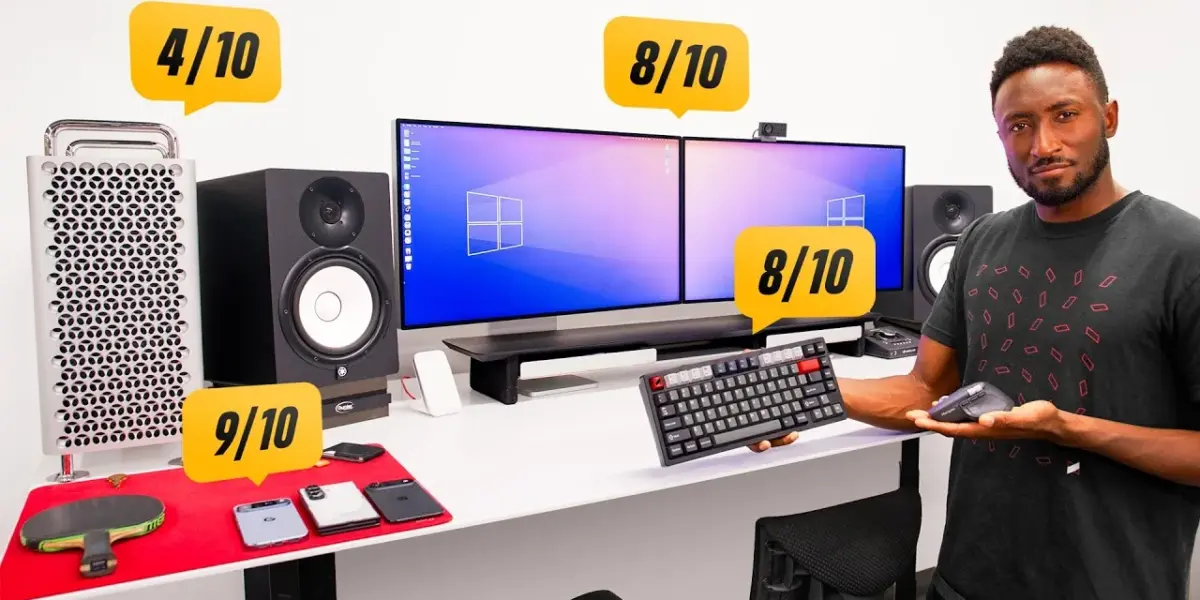
KHC’s Desk Deep Dive: A Decade of Workflow Essentials
In a candid and comprehensive review, tech vlogger KHC pulls back the curtain on the tools that have defined his workflow for years, even decades. This isn’t about the latest releases; it’s about the battle-tested gear that has earned its permanent spot on his desk. As KHC puts it, “The tools are just tools. The sculpture is not great because of the chisel that the artist uses, but you better believe that if that artist uses the same chisel for 10 years straight, they’re going to know it really well.” This philosophy shines through as he dissects everything from his colossal sit-stand desk to his trusty headphones.
The Foundation: A Rock-Solid Workspace
The centerpiece of KHC’s setup is the Next Desk Air Pro (now Xesk), a sit-stand desk with an astonishing 96×38-inch aluminum surface. “It doesn’t bend at all, which is kind of crazy. It doesn’t rock or really shake. It’s rock solid,” he exclaims. Despite its near-decade of service and a minor quirk of requiring a constant button press to adjust height, KHC rates it a solid 9/10, calling it his “forever desk.”
Complementing the desk is the Herman Miller Embody chair, a piece of furniture KHC considers one of his “best investments ever.” Praised for its supreme comfort and adjustability, which has now molded perfectly to his form, the Embody earns a perfect 10/10. “The investment in your comfort and your back makes it worth it,” he asserts.
The Powerhouse: A Mac Pro at a Crossroads
The M2 Ultra Tower Mac Pro, purchased six years ago for a hefty $12,000-$13,000, represents KHC’s most contentious piece of hardware. Featuring a 24-core CPU, 76-core GPU, 192GB RAM, and 8TB of storage, it was once Apple’s most powerful offering. However, with the advent of M3, M4, and M5 chip generations, and the Mac Studio now holding the crown, the Mac Pro feels dated. Its saving grace is a crucial OWC 64TB Thunderbolt SSD for live backups, a necessity for his workflow. “This is going to be replaced pretty soon,” KHC predicts, hoping for an M5 Ultra Mac Studio successor. For now, it scores a lukewarm 4/10.
Visuals: The Pro Display XDR Experience
KHC relies on a dual-monitor setup featuring two Apple Pro Display XDRs. Each $7,000 display (including the stand and nano-texture glass) is a 60Hz, 32-inch LED-backlit LCD. While acknowledging their niche appeal and the extreme effectiveness of the nano-texture finish in his bright studio, KHC notes their impracticality for everyday tasks beyond professional color grading. “I also have speakers and a webcam separately so they’re fine,” he mentions, highlighting the lack of integrated features. Despite the high cost and cleaning challenges, their color accuracy for matching and reference earns them an 8/10.
Organization and Audio: The Supporting Cast
For desk organization, KHC uses a Grovemade shelf, rating it a perfect 10/10 for its functionality and aesthetic, though he notes cheaper alternatives exist. The audio setup is anchored by the Yamaha HS8 studio monitors, which KHC has used for years. He praises their versatility for editing and music listening, noting their impressive 40Hz bass response without a subwoofer. A minor annoyance is RF interference from nearby devices, but their overall performance and familiarity earn them a 9/10.
His audio interface, a Thunderbolt-connected DAC with a satisfyingly large volume knob, receives a lower score of 4/10. While functional, KHC laments its buggy software and frequent need for resets and firmware updates. For personal listening, KHC opts for the Sennheiser HD 650 open-back headphones, valuing their comfort, light weight, and excellent sound quality for reference work. He gives them an 8/10, appreciating their wired simplicity over potential wireless bulk.
Charging and Input: The Daily Drivers
Charging duties are split between a Belkin 3-in-1 charger (6/10), which handles multiple devices but lacks speed, and an older, fast Airvuk wireless charger (8/10). Input devices are a unique combination: the Rainy 75 Light keyboard (8/10) is praised for its Mac compatibility, wireless operation, and solid build, especially for its price point. The Logitech MX Master 4 mouse (9/10) is a favorite for its silent operation, good software, and improved finish over previous models. He also uses an Apple Magic Trackpad simultaneously, a workflow quirk dictated by his decade-long use of Final Cut Pro.
The Finishing Touches: Mousepads and Accessories
The Artisan Ninja FX mousepad (9/10) is a long-term favorite, chosen for its specific feel and performance, though its durability requires replacement every couple of years. KHC also utilizes a second, softer mousepad for miscellaneous items like phones, wallets, and keys, keeping the metal desk surface clear.
Verdict: A Workflow Built on Proven Tools
KHC’s desk tour reveals a curated collection of tools chosen not for hype, but for long-term reliability and performance. While some items show their age or have minor drawbacks, their consistent presence in his demanding workflow speaks volumes. For those seeking a similar, cost-effective setup, KHC directs viewers to a separate video comparing a full studio build for less than the price of a single Pro Display XDR.
Specs & Key Features
- Desk: Xesk (formerly Next Desk) Air Pro Sit-Stand Desk (96″ x 38″ aluminum surface)
- Chair: Herman Miller Embody
- Computer: Apple Mac Pro (M2 Ultra, 24-core CPU, 76-core GPU, 192GB RAM, 8TB SSD) with OWC 64TB Thunderbolt SSD
- Displays: 2x Apple Pro Display XDR (32-inch, 6K, 60Hz, LED-backlit LCD, nano-texture glass)
- Webcam: Opal C1
- Shelf: Grovemade Desk Shelf
- Audio Interface: External Thunderbolt DAC
- Monitors: Yamaha HS8 Active Nearfield Studio Monitors
- Headphones: Sennheiser HD 650 Open-Back
- Chargers: Belkin 3-in-1 Wireless Charger, Airvuk Fast Wireless Charger
- Keyboard: Rainy 75 Light Mechanical Keyboard
- Mouse: Logitech MX Master 4
- Trackpad: Apple Magic Trackpad (USB-C)
- Mousepad: Artisan Ninja FX (main), Soft surface pad (secondary)
Source: Reviewing Everything on my Desk! (2026) (YouTube)

Related Articles


Samsung’s TriFold: A Rare Gem, Hard to Get
Samsung's elusive Galaxy Z TriFold, a phone with two hinges that unfolds into a tablet, proved incredibly hard to obtain. After a difficult purchase and software modifications, it offers a unique glimpse into foldable tech, but remains a niche product for enthusiasts.


Apple’s 50 Best Gadgets: You Decide!
Apple is celebrating 50 years with a community-driven ranking of its 50 best gadgets. The Verge's interactive tool lets you pick your favorite products in head-to-head matchups. Help decide which Apple creations made the biggest impact.


Android Outshines iOS in Key Usability Areas
Android is outperforming iOS in crucial areas like notification management and overall usability. Its intuitive design and smarter alerts offer a less distracting phone experience. While Apple focuses on AI, Android's practical advantages currently make it the superior choice for many users.