Anthropic’s Claude Co-work Adds Remote Control for AI Agents
Anthropic's Claude Co-work now lets users remotely control their AI agent via smartphone with the new 'Dispatch' feature, bringing it closer to advanced AI agents. Adobe Photoshop's beta adds AI-powered 3D object rotation, and Google Maps is getting smarter with Gemini integration.

Anthropic’s Claude Co-work Adds Remote Control for AI Agents
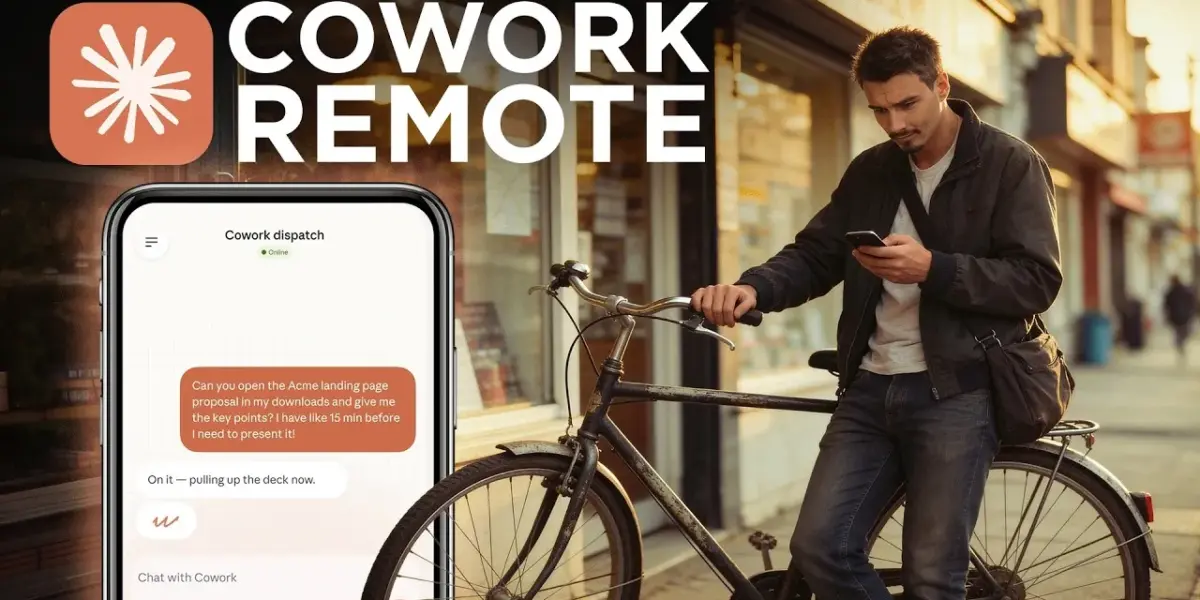
The race to build more capable and user-friendly AI agents is heating up. Anthropic, a leading AI safety company, has just released a significant update to its Claude Co-work tool, adding a feature called ‘Dispatch’ that allows users to remotely control their AI agent from their phone. This move brings Claude Co-work much closer to the functionality of more complex, self-hosted AI agents like OpenClaw, but in a more accessible and consumer-friendly package.
What are AI Agents?
Before diving into the updates, it’s important to understand what an AI agent is. Think of chatbots like ChatGPT as assistants that can answer questions or help you write. An AI agent, on the other hand, is designed to not just assist but also to actively ‘get things done.’ This often means the agent needs to interact with your computer’s operating system, manage files, or perform tasks automatically. While powerful, these agents have typically required dedicated machines and technical setup, making them less accessible for everyday users.
Claude Co-work Takes a Leap Forward
Claude Co-work has been evolving to bridge this gap. Previously, it lacked two key features that users desired for a truly hands-off AI experience: the ability to schedule tasks and the capability to be remotely controlled. Anthropic has now addressed both. The scheduling feature was added a few weeks ago, allowing users to set tasks for the AI to perform at specific times. The latest addition, ‘Dispatch,’ tackles the remote control aspect.
With Dispatch, users can now use their smartphone as a walkie-talkie to communicate with Claude running on their computer. The process involves updating both the desktop and mobile apps. After scanning a QR code to pair the devices, users can see the same interface on their phone as on their computer. This allows them to give commands, such as organizing files on their desktop, directly from their mobile device.
A More Secure and Polished Experience
The ability to remotely control an AI agent is a big step. It means users don’t need to be physically at their computer to manage tasks. Anthropic’s approach with Claude Co-work is notable for its focus on user-friendliness and security. Unlike more complex agents that might require deep system access, Claude Co-work only asks for file access to specific folders, like the desktop or documents. Users can even choose to confine the AI to its own dedicated folder, limiting its impact on the rest of the system. While this offers a more secure option, it’s still wise to back up important files before granting any AI agent access to modify them.
This update positions Claude Co-work as a more polished and accessible alternative to existing AI agents. It aims to provide the power of an AI agent without the steep learning curve or the need for specialized hardware.
Other AI Agent Developments
Anthropic isn’t the only company exploring the AI agent space. Several other players are also developing their own versions:
- Genspark: Is creating its own version called Genspark Co-work.
- Manos: Is introducing ‘My Computer,’ a competing product.
- Perplexity: Offers a polished version of an AI agent that is very similar in interface to Claude Co-work. However, Genspark and Manos run through a web browser, while Perplexity and Claude Co-work require a desktop application.
Despite these advancements, there’s a general confusion about the practical, everyday use cases for these agents among both developers and consumers. Many companies are showcasing a wide range of potential applications, but it’s not always clear what truly moves the needle for the average user. The focus seems to be shifting from AI assistants to AI agents, but the most impactful personal applications are still being discovered.
Adobe Photoshop Enhances Creativity with AI
Beyond AI agents, Adobe is integrating powerful AI features into its creative tools. Photoshop’s beta version now includes a ‘Rotate Object’ feature that uses AI to generate the missing sides of an object when it’s rotated in 3D space. This is a significant advancement for 3D manipulation, making complex tasks much more accessible.
For instance, a user can take an image of a cat wearing a hat, isolate it, and then rotate it. The AI fills in the unseen parts, creating a surprisingly convincing 3D representation. This feature, combined with other AI tools like ‘Harmonize’ for color matching, can drastically speed up creative workflows. While this capability used to require advanced skills and significant time, it’s now achievable with a few clicks. This feature is currently available in Photoshop beta and requires a Creative Cloud subscription.
Google Maps Gets Smarter with Gemini
Google is also infusing AI into its popular applications. Google Maps is receiving updates powered by Gemini, its AI model. These features, currently limited to the US and India and primarily available on mobile, aim to make navigation more intuitive.
One of the key improvements is enhanced visualization for navigation. Instead of just relying on arrows, the AI can provide clearer, more context-aware directions, helping users avoid confusion at complex intersections or multi-lane exits. Additionally, Google Maps will use users’ past search history within the app to offer more personalized recommendations for places and routes moving forward. While these features are impressive, their rollout can sometimes be slow and inconsistent, a common characteristic of Google’s product releases.
Other Notable AI Updates
- Google Workspace with Gemini: Google continues to integrate Gemini into its Workspace suite, including PowerPoint and Sheets. This allows Gemini to connect with other applications for team-focused workflows, though reliability remains a concern for some users.
- OpenAI Sora References: OpenAI’s video generator, Sora, has added a reference feature allowing users to incorporate specific objects into new scenes. However, early tests suggest that Google’s V3.1 video model is more reliable and produces better overall quality for this specific task.
- IBM AI Webinar: IBM is hosting a webinar on March 26th, 2026, focusing on ‘Context Engineering for Students,’ using IBM Granite as an academic co-pilot. The session aims to teach foundational concepts for working with AI tools.
- AI for Real Estate: A Florida man successfully used ChatGPT to help sell his house, from suggesting renovations to writing the listing description, demonstrating practical AI applications in everyday tasks.
- Interactive Learning vs. Claude Visuals: OpenAI’s ‘interactive learning’ feature, designed to help with math and science, has shown a low success rate. In contrast, Claude’s ‘visuals’ feature, which functions like giving AI a whiteboard, has proven highly effective and is considered a valuable tool for learning and problem-solving.
These updates highlight a broad trend in AI development: making powerful tools more accessible, integrating them into everyday applications, and exploring new ways for AI to interact with and assist humans.
Source: Anthropic Made a Safer OpenClaw & More AI News You Can Use (YouTube)

Related Articles
Anthropic Hints at ‘Mythos’: A Leaked AI Powerhouse
Anthropic's most powerful AI model, Claude Mythos, has reportedly been leaked online. This new model shows significant advancements in coding, reasoning, and cybersecurity, surpassing previous versions like Claude Opus 4.6. Anthropic is proceeding with caution due to potential risks, especially in cybersecurity, and is working on efficiency and cost before a wider release.


New AI Models Spark Urgency, Face Tough Benchmark Test
OpenAI and Anthropic are reportedly developing powerful new AI models, but a new benchmark, ARC AGI 3, reveals significant gaps in AI's abstract reasoning abilities compared to humans. The benchmark challenges the notion that AGI has already been achieved, highlighting the complexities and risks in the current AI development landscape.


Claude AI Takes Control of Your Computer
Anthropic's new Claude feature, Computer Use, allows the AI to control your computer with simple prompts, even from your phone. This raises questions about job security and AI's role in the workplace. The tool offers advanced automation but comes with considerations compared to open-source alternatives.